

Salary Breakdown — Advanced (Step-by-step)
Upper Limit (annual) Rate % Action
(total)
(pre-tax)
(after standard ded &
employee ded)
(after tax)
(CTC)
The primary element in an employer-employee relationship is the compensation package. And the salary component in it plays the most important part.
As a financial component of the compensation package, salary provides the monetary support to have a decent lifestyle.
So, influencing both employee well-being and employer success.
Moreover, it acts as an imminent motivator for employees. Attracting a variety of skilled individuals and retaining talented workers.
But the salary structure for every kind of job is not the same. That’s where a salary calculator comes in handy.
Simply, by taking the basic numbers from the users, it helps calculate the in-hand salary, take-home salary, bonuses, additional incentives, and more. Making the process easy.
So, keep reading this blog to learn more!
What Is A Salary Calculator?

To explain in simple terms, a salary calculator is an easy-to-use digital tool that helps calculate all the components of salary, from CTC to take-home.
That is, the employee can evaluate their monthly salary, total company deductions, take-home salary, and more.
So, in the tool, the user just fills in the specific CTC amount, additional incentives, professional tax deductions, and monthly employee and employer PF to calculate the net result.
Components Of Salary In India
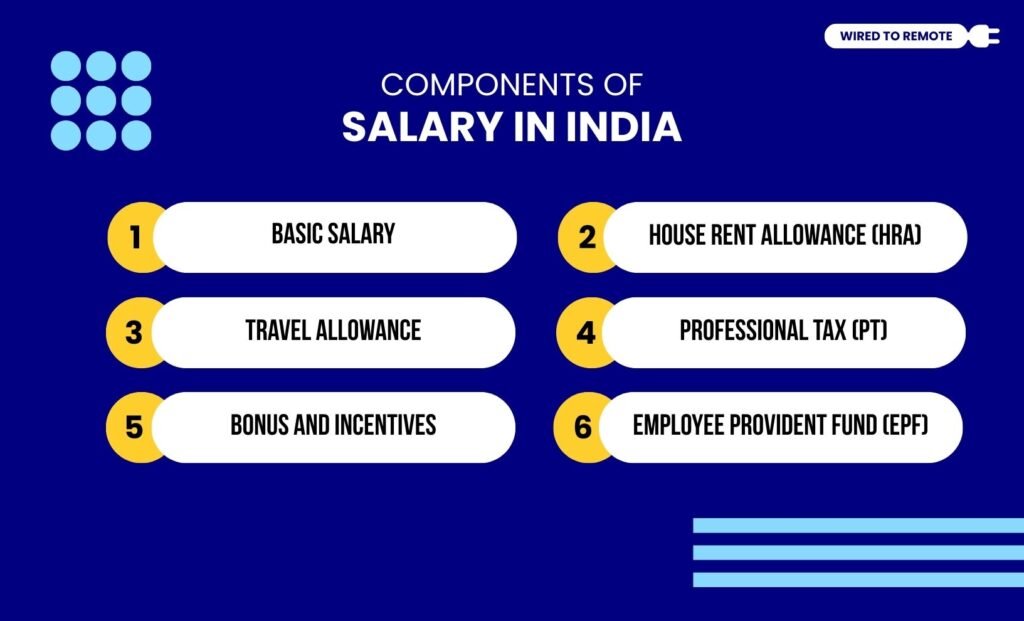
Here are the components of salary for both on-site and remote employees in India—
- Basic Salary: This is the fixed part of the CTC that roughly covers up to 40-50% of the total salary amount. So, the employer determines it based on the employees’ qualifications, skills, experience, and knowledge.
- House Rent Allowance (HRA): For covering the employees’ house rent, the HRA is provided by the employer. Moreover, under Section 10 (13A) of the IT Act in India, the HRA is fully or partially exempted from taxes.
- Travel Allowance: Additionally, the salary includes travel allowance for employees’ commute. Also, this part is completely exempt from taxes under Section 10 (5) of the Act.
- Professional Tax (PT): Annually, the professional tax is charged on the salaries of the employees. But it can go up to ₹2,500 only.
- Bonus And Incentives: Moreover, all kinds of bonuses, special allowances, and incentives are included in the gross salary. But the amount is fully taxable. So, its tax is deducted as income tax.
- Employee Provident Fund (EPF): Finally, the EPF part is the 12% contribution of the employee from their monthly basic salary. Moreover, under Section 80C of the Act, the amount does not add up to the monthly salary.
How To Calculate The Different Components Of Salary?

Given that the salary structure has so many components, calculating the monthly salary can be complex. So, here are the formulas for mathematically calculating the different components.
1. Cost to Company (CTC)
Basically, the complete compensation package offered by the employer is considered the cost to the company or CTC. So, it includes all the components of salary— fixed and deductibles.
CTC = Basic Salary (including EPF) + Travel Allowance + HRA + Benefits + Employer PF + Bonus
So, the calculator of the CTC covers the entire financial as well as the benefits offered by the employer to the employee.
2. Gross Salary
The gross salary is the total amount of salary the employee is promised to get without the contributions of the employer. That is, it excludes gratuity, health insurance, and other components.
Gross Salary = Basic Salary + Travel Allowance + HRA + Special Allowance + Bonus / Incentives (monthly)
So, it consists of the basic salary, all kinds of allowances (HRA, travel, and special), and monthly bonuses or incentives.
3. Salary Deductions
Salary deductions are the employee contributions to the provident fund and income taxes. That is, the monthly deductions from the gross salary.
Salary Deductions = EPF + Professional Tax + TDS (Income Tax) + Other Deductions
So, it is calculated by combining all the deductible amounts. Also, including taxes and EPF from the gross salary to get the Net Salary amount.
4. Take-Home Salary
Finally, the take-home salary is the total amount of salary that the employee gets after all the deductions are subtracted and all allowances are added. And, the formula is—
Net Salary (In-Hand) = CTC – (Employer Contributions + Taxes + Other Salary Deductions)
So, it is the final amount from the salary that the employee gets at the end of every month— including incentives and bonuses, with the fixed amount.
How Does A Salary Structure Calculator Work?
Since calculating the in-hand salary is quite difficult, the salary calculator can help in determining the component amounts.
So, whether you need a salary breakup calculator or a salary in hand calculator, the Wired To Remote Salary Calculator has it all. Here’s how to use it—
- Firstly, fill the CTC box with the compensation package you get.
- Then, enter other details like the bonus percentage or the amount.
- Also, fill in the deductible amounts— income tax, EPF, and others.
- Finally, click on the Calculate button. And, the entire Net Salary will be displayed. Also, the other details of your salary will be displayed in a table.
Common Examples Of Salary Calculator Online
Here is an example of how the salary calculator works for an employee. So, if the employee gets around ₹600,000 as the CTC. And, they get a yearly bonus of ₹50,000.
Moreover, the PT is ₹2,500, the EPF contribution is ₹1,500, and the employer’s contribution is ₹21,000.
So, the Net Salary will become—
Net Salary = CTC – (Employer contributions + Tax + EPF + Bonus)
That is—
Net Salary = ₹600,000 – (₹1,500 + ₹2,500 + ₹21,000 + ₹50,000) = ₹525,000
So, the employee gets around ₹525,000 in-hand salary for every financial year.
Benefits Of Using A Monthly Salary Calculator In India
Using a monthly salary calculator in India can be quite beneficial. So, here are some of its core advantages—
- Accurate Salary Details: Firstly, the salary calculator provides a complete, detailed breakdown of the various components of the salary. So, it is easier to budget with the comprehensive breakdown.
- Decision-Making: Moreover, it shows the change in the salary details with a change in the package. So, helping the users to make informed decisions about earnings, paying taxes, and managing their living expenses.
- Negotiation With Employer: Finally, the detailed salary structure can help in negotiating the net pay with the employer. So, the employee’s expectations align with the amount they are getting in hand.
Things To Keep In Mind While Calculating Salary In India
Calculating the salary in the Salary Calculator of Wired To Remote is quite simple and easy. But a few considerations should be made while calculating the exact net pay—
- Clearly filling the boxes with the exact amount for deductibles and allowances.
- Avoiding the reduction of certain components based on assumptions.
- Understanding the compensation package— financial and non-financial elements.
Remember, the salary is the direct compensation your employer pays you for your dedicated services. So, you should not compromise on it.
And, with this calculator right at the top of the page, you can decide what net pay you deserve for your work. So, go ahead and check the amount for different components today!
FAQs
Here are some of the most common questions that you can check.
Generally, the calculation for the net salary or in-hand salary starts with finding the gross salary from the CTC. Then, subtracting the deductions from the gross salary will give the exact net salary. So, you can find the in-hand amount by following this formula—
Net Salary = Gross Salary – Deductions
Firstly, just input the CTC and the tax details from your salary in the specific boxes of the calculator. Then, add the bonus percentages or the exact amount of incentives. Finally, click on Calculate, and the net salary will be displayed.
Generally, using a third-party tool to calculate salary can have some safety and security hazards. But if you are using reputable Salary Calculators, then there are fewer chances of encountering phishing or fraud. So, use safe and reliable calculators only.



Leave A Comment