
Remote work has always been taboo in the corporate world due to its lack of productivity. But that was way before it became the norm for corporate workers.
Now, productivity has skyrocketed in remote work. Making companies directly compare the significant change in the productivity percentage.
As the report from Forbes highlighted—
“A study from the National Bureau of Economic Research (NBER), which found that businesses relying on remote work, such as IT and finance, saw productivity growth increase from 1.1% between 2010 and 2019 to 3.3% since the start of the pandemic.”
And, this massive productivity boost is the direct result of the incorporation of productivity tools.
That is, with these tools, remote teams could organize, manage, and monitor tasks for multiple projects without losing their cool.
Among the countless tools, Airtable and Notion found their popularity spotlight in the remote community.
With their dynamic tools and unique features, they made task management a piece of cake. Enhancing the overall productivity of the teams.
But the question is — “Between the two, which is a better remote-fit?” Well, that’s what I am going to debunk today.
In this Airtable vs Notion blog, I have discussed the key differences in the diverse aspects of the tools, focusing on—
- Data management and project handling qualities,
- Pricing models and collaboration features,
- Pros and cons of each tool, and more.
So, come dive right in!
What Is A Productivity Tool? Understanding Airtable And Notion
First things first, both Airtable and Notion are productivity tools. That is, they are designed to manage multiple projects so that the teams meet their deadlines without stress or any delays.
As the report from Zapier points out—
“Both tools stem from a similar fast-moving, collaboration-focused project management philosophy, which means that they both make it possible for you to work with other people, automate various aspects of your setup, and integrate with the other tools you rely on. But when it comes down to it, they’re totally different apps.”
Airtable
Unlike other tools, Airtable offers a cloud-based platform for project management. So, users can access the databases from anywhere and organize the tasks to meet the deadlines.
Moreover, its focus is on data management. So, within its robust database management system, users can easily organize, store, and share project files with other team members. And, this streamlined data management helps improve productivity.
Notion
On the other hand, Notion is an improved version of the note-taking app. So, it offers a massive suite of features for managing and automating tasks that enhance productivity.
In addition to this, Notion offers an all-in-one workspace to remote workers. That is, the users can allocate tasks, track progress, document the reports, and collaborate with cross-functional teams. So, giving a single flexible tool for productivity tweaks.
Airtable vs Notion: Key Features Comparison
Even though both Airtable and Notion predominantly belong in the productivity tools category, they are not the same.
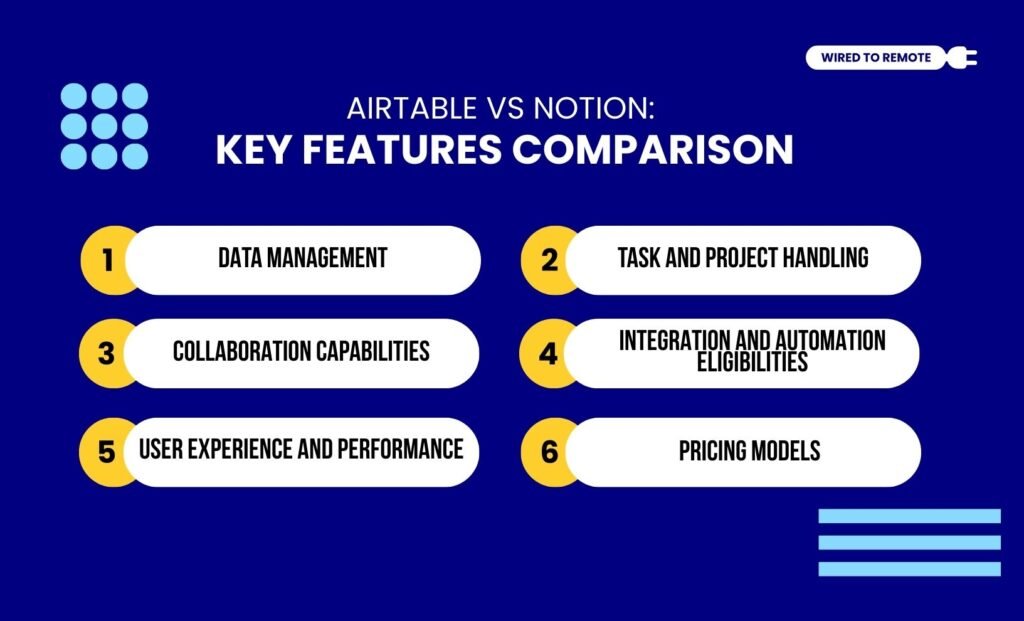
That is, they have different priorities and diverse sets of features. So, some of their shared dissimilarities include—
1. Data Management
In comparison, Airtable offers a robust data management tool with cloud-based databases and advanced automation features. So, users can organize the project files within a centralized system.
On the other hand, Notion is a document-centric platform. So, its features are more focused on creating documentation for managing the workspace.
In addition to this, Notion allows users to create “Database blocks” to store and organize project files. But it is not as robust and dynamic as Airtable’s cloud-based system.
2. Task And Project Handling
Airtable provides diverse customization options for task management. So, multiple project management on a single platform becomes easy.
That is, users can customize the timelines and task blocks based on the requirements of the different projects.
Moreover, it has a variety of data visualization tools — Gantt charts, Calendars, Kanban boards, and Gallery files. Making it easier to visualize the raw data and adjust the workflows.
In contrast to Airtable, Notion has pre-built templates and customization options for diverse tasks. So, users can choose from the templates based on the project type.
In addition to this, Notion also allows users to visualize the data through a variety of tools — List, Table, Calendar, Gallery, and Boards. But they are not on par with the Airtable tools.
3. Collaboration Capabilities
Between the two, Notion is a text-focused tool. So, naturally, it offers better real-time collaboration features in the workplace. That is, workers can easily comment, mention, and share diverse data files with cross-functional teams.
Contrarily, Airtable has a more collaborative data management system. So, users can share files and access data from the cloud storage easily. But it comes with limited commenting or sharing features.
4. Integration And Automation Eligibilities
Airtable and Notion offer different levels of integration and automation capabilities.
For instance, Airtable is best known for its data-driven and automation features. Whereas Notion comes with a strong integration platform.
Moreover, Airtable’s built-in automation helps manipulate data to manage projects without needing any external integration.
But Notion has no such built-ins. So, it offers massive integration capabilities for seamlessly integrating third-party tools and software — Zapier, Microsoft, and more — with the APIs.
5. User Experience And Performance
Even though both tools have intuitive interfaces, they are not beginner-friendly. That is, the complex features of both the tools make it challenging for users.
But, in comparison, Notion’s interface and design are simpler and user-friendly than Airtable’s interface. So, users can better navigate through Notion.
Moreover, in terms of performance, both Airtable and Notion provide high-end performance. So, incorporating either of them is beneficial for remote teams.
6. Pricing Models
Finally, both Airtable and Notion are semi-paid platforms. That is, they offer both free and paid plans with different sets of features. So, here are the pricing models of each—
- Airtable
| Plan | Pricing | Features |
|---|---|---|
| Free | $0 | Basic features with limited database storage. |
| Team | $20 per month | Moderate-level features with database storage, automation runs, and attachment options. |
| Business | $45 per month | Advanced data management system with automation and high data security features. |
| Enterprise | Custom pricing | Custom data management and automation features based on enterprise needs. |
| AI Assistant | $20 per month | Including the add-on AI assistant to any existing plan. |
- Notion
| Plan | Pricing | Features |
|---|---|---|
| Free | $0 | Unlimited database blocks and limited collaboration features. |
| Plus | $8 per month | Basic features with large file uploads, team collaboration, and data history. |
| Business | $15 per month | Advanced data management and data security features, along with project management tools. |
| Enterprise | Custom pricing | Custom features and integration capabilities based on enterprise needs. |
| AI Assistant | $10 per month | Including the add-on AI assistant to any existing plan. |
Airtable vs Notion: Pros And Cons
Even though both Airtable and Notion are strong productivity tools, they come with their own set of benefits and challenges. So, here is a breakdown of their pros and cons.
- Airtable
| Pros | Cons |
|---|---|
| 1. Offers a strong and structured database management system. | 1. Paid plans are expensive. |
| 2. Comes with built-in automations and customization capabilities for tasks. | 2. Limited features and capabilities with the free version. |
| 3. Provides over 100 pre-built templates for diverse task scenarios. | 3. Might be complex for beginners. |
- Notion
| Pros | Cons |
|---|---|
| 1. Offers an all-in-one platform for project management with a database system, workspaces, task scheduling, and automation options. | 1. Might sometimes face performance issues. |
| 2. Support rich and extensive formats of documents for smooth task management. | 2. Limited access to offline data and project management features. |
| 3. Provides a massive set of features and dynamic customization tools with its free plan. | 3. Might be complex for beginners. |
Airtable vs Notion: Choosing The Right Productivity Tool
Having either Airtable or Notion is not enough. Knowing which one best suits your team is the key. So, here are some tips to choose the right productivity tools for managing your remote team’s projects—
- If you are working with creative agencies, marketing teams, or small media businesses, Airtable’s virtual database and high automation make it the perfect fit.
- But if you are working with startups, large organizations, the IT sector, or education firms, Notion’s integration and versatility are best suited.
According to the report from the Digital Project Manager—
“In my opinion, Airtable is best for teams that need a powerful database tool with a familiar spreadsheet interface, especially in marketing or project management, where clear data organization is essential. Notion is ideal for creative teams or individuals whose use cases require a flexible workspace for note-taking and managing tasks and projects. It’s a great fit for startups or freelancers who value customization.”
So, based on the kind of team you are working with and your needs, you can choose between the two. And, if you haven’t really tried either of them, it’s high time to use one to boost your productivity today!
FAQs
Here are some common questions users often look for around the dilemma of Airtable vs Notion for remote teams.
Since both tools offer different capabilities, it is nearly impossible to claim one app is better than the other. With Airtable, users get better database management and faster performance.
Whereas with Notion, users find organizing tasks and managing workflow easier. So, based on the requirements of the team, the better of the two can be chosen.
Yes, absolutely. Switching from Airtable to Notion or vice versa is not that difficult. You can use either the manual method or the automated migration method to switch from one to the other.
So, for the manual method, you need to export the data in a CSV file and then import the data file into the other.
Alternatively, using the automated method, users can integrate a third-party app to connect both the tools and sync up the data. So, it becomes easier to transfer data from one tool to another.
Other than Airtable and Notion, there are countless similar apps in the digital space. So, some of the alternatives to these tools include—
• Asana — Provides a strong project management tool for professionals to handle the daily tasks, project progress, and automates workflows.
• ClickUp — Comes with a comprehensive set of features and dynamic tools for task management, collaboration, and project planning.
• Smartsheet — Offers a spreadsheet-like interface for reports on task delegations and monitoring project progress.
• Evernote — Prioritizes organizing notes and documentation of projects for streamlined and smooth workflows.
• Microsoft To-Do — Integrated within the Microsoft 365 ecosystem, it allows users to keep track of task progress and manage projects efficiently.
• Coda — Similar to Notion, it allows users to combine data with documents and use automations for the reports on project progress and task management.
• Monday.com — Offers a more versatile software for customizing diverse task management and meeting project deadlines efficiently.


Leave A Comment